01 User Story & Pain Points
The Status Quo: On-Premise Dependency
Currently, IT Administrators rely on Group Policy, a decades-old tool designed for a pre-cloud era. The workflow is strictly linear and constrained to the corporate firewall: an Admin defines a rule (ADMX) on a local server and "pushes" it to devices on the internal network.
The Gap
This model assumes all devices are "in the building." It breaks down immediately when devices move to the cloud or off-network, leaving Admins with no control and no feedback loop.
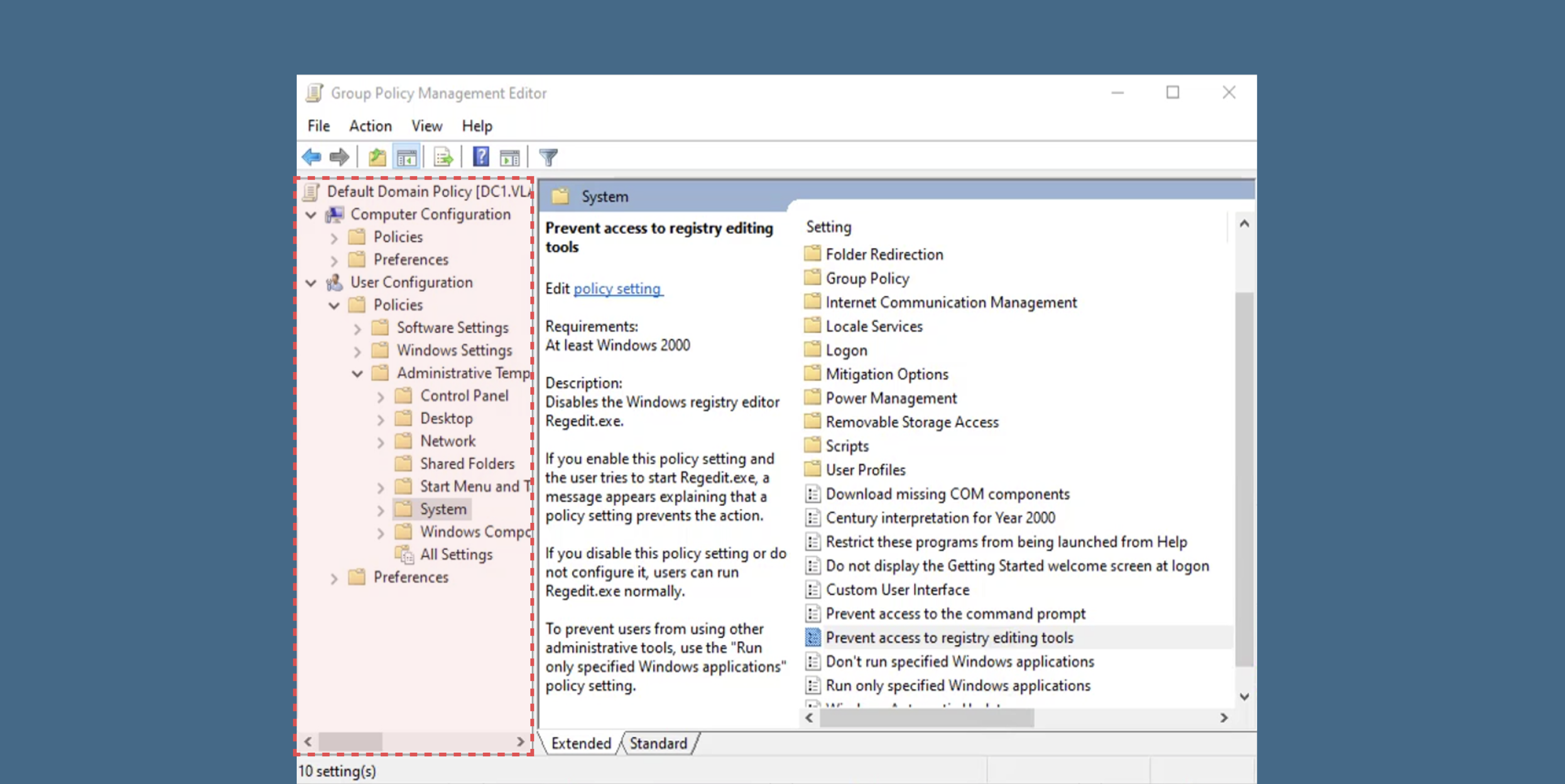
The "Endless Tree" Navigation
Finding a single setting requires clicking through 10+ layers of nested folders. This forces Admins to rely on memorization rather than intuitive discovery, making the tool impossible for new users to learn without extensive training.
Friction Analysis
Scalability Blockers
Legacy tools cannot manage devices outside the corporate firewall or across hybrid cloud environments.
Fragmented UI
Switching between disjointed tools creates a steep learning curve and inefficient workflows.
No Visibility
Admins cannot detect "Compliance Drifts" or link specific rules to device failures.
Strategic Drivers
Driving the Shift from On-Prem to Cloud
The strategic goal was to accelerate enterprise migration to Azure by removing the dependency on local hardware.
-
Reduce CostEliminate the need for customers to maintain expensive local servers for policy management.
-
Unblock Hybrid GrowthEnable support for major enterprise clients (like Nike, Home Depot) with complex, hybrid infrastructure requirements.
Defining Success
We measured impact through efficiency gains and adoption velocity.
02 Research & Discovery
Decoding the Administrator's Mental Model
Qualitative interviews with IT Administrators revealed critical gaps in the legacy workflow. While the "Group Policy" model worked for local networks, it failed to scale for hybrid cloud environments due to a lack of feedback loops and rigid, linear processes.
Insight 01: The "Reuse" Dependency
Admins don't want to start from scratch. Research indicated that administrators rely heavily on "Golden Templates"—proven configurations refined over years.
Instead of forcing users to code new rules, the design must prioritize Template Ingestion , allowing teams to migrate existing logic rather than rewriting it.
Insight 02: The Visibility Gap
From "Fire and Forget" to "Continuous Auditing." The legacy model functioned as a one-way execution path with no confirmation of success.
The new system needed to shift the core mental model from static configuration to Dynamic Remediation —providing real-time data on compliance drifts and automatically fixing failures.
Mental Model Shift
Blind Execution
Admin manually edits GPO settings and hopes they propagate without errors.
Continuous Compliance
Select templates, apply automatically, and view real-time audit feedback.
"We moved the user experience from blind execution (legacy) to continuous verification (cloud)."
03 Ideation & Trade-offs
Configuration Strategy
The Conflict: Cloud-native engineers prefer the granular control of defining individual policies (Infrastructure-as-Code), but traditional IT Admins are accustomed to applying pre-built "Golden Templates" (GPO Baselines). Forcing Admins to rebuild thousands of settings from scratch was a major blocker to adoption.
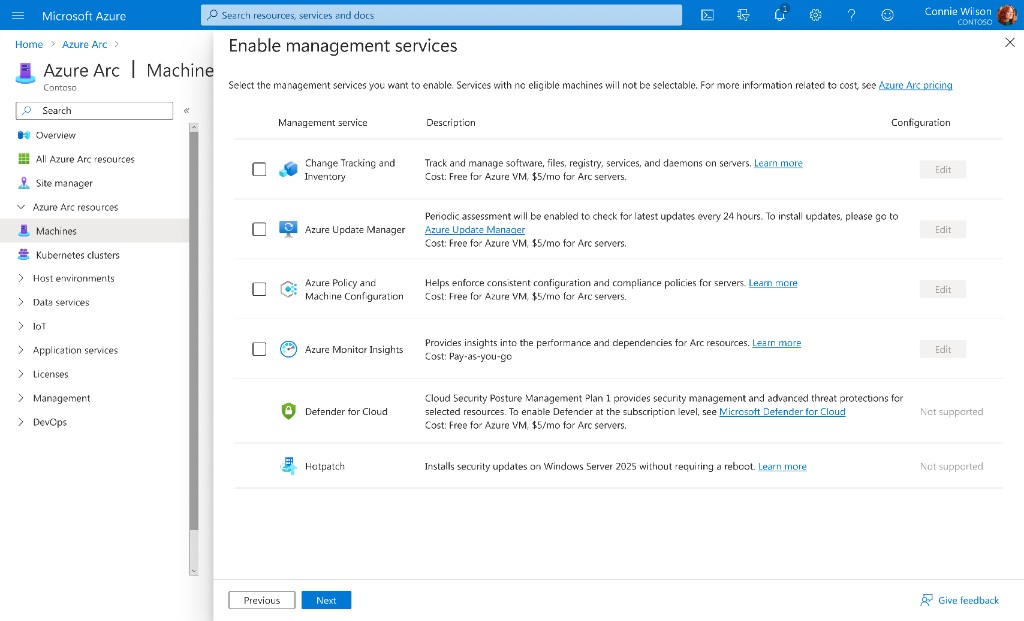
Option A: Granular Policy Definitions
Users define or select individual settings one by one (e.g., "Password Length," "Screen Timeout") via JSON or detailed forms.
Pros: Maximum flexibility; follows "Infrastructure as Code" best practices; zero ambiguity.
Cons: High Friction. Migrating an on-prem environment requires manually mapping 5,000+ settings. Extremely steep learning curve for non-developer Admins.
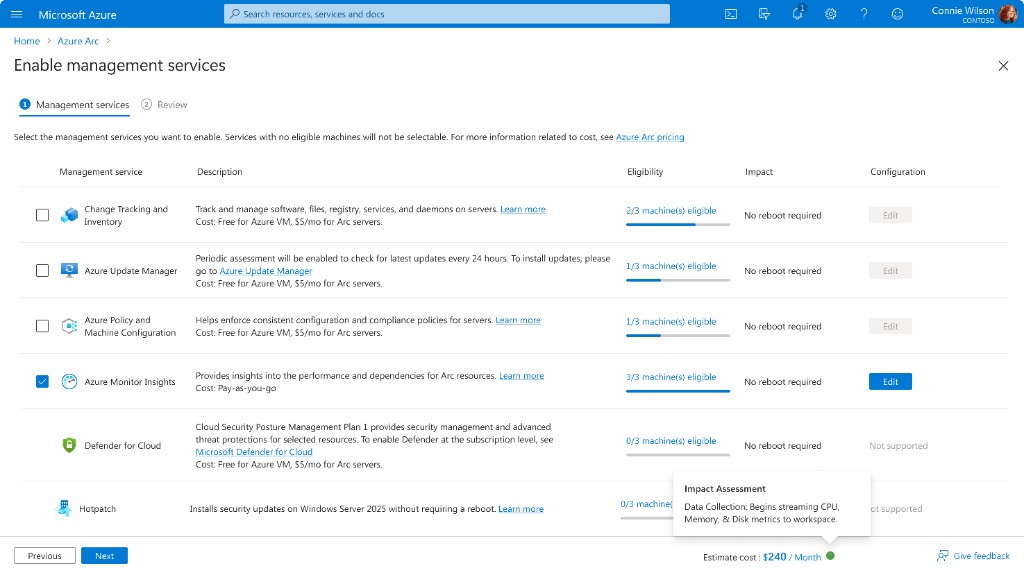
Option B: Template Ingestion & Baselines
Users upload existing GPO templates (ADMX) or select industry-standard "Security Baselines" to apply hundreds of settings in a single action.
Pros: Reduces setup time from weeks to minutes; aligns with the Admin's existing mental model of "Golden Images."
Cons: Hides underlying complexity; requires a robust parser to translate legacy templates into modern cloud rules.
The Verdict
We chose Option B (Faceted Search). To mitigate the learning curve, we introduced "Saved Views," allowing Admins to create shortcuts that feel like folders but retain the power of a search engine.
The Deployment Model
The Conflict: In the legacy tool, "Saving" meant "Deploying" immediately, causing anxiety about breaking production environments.
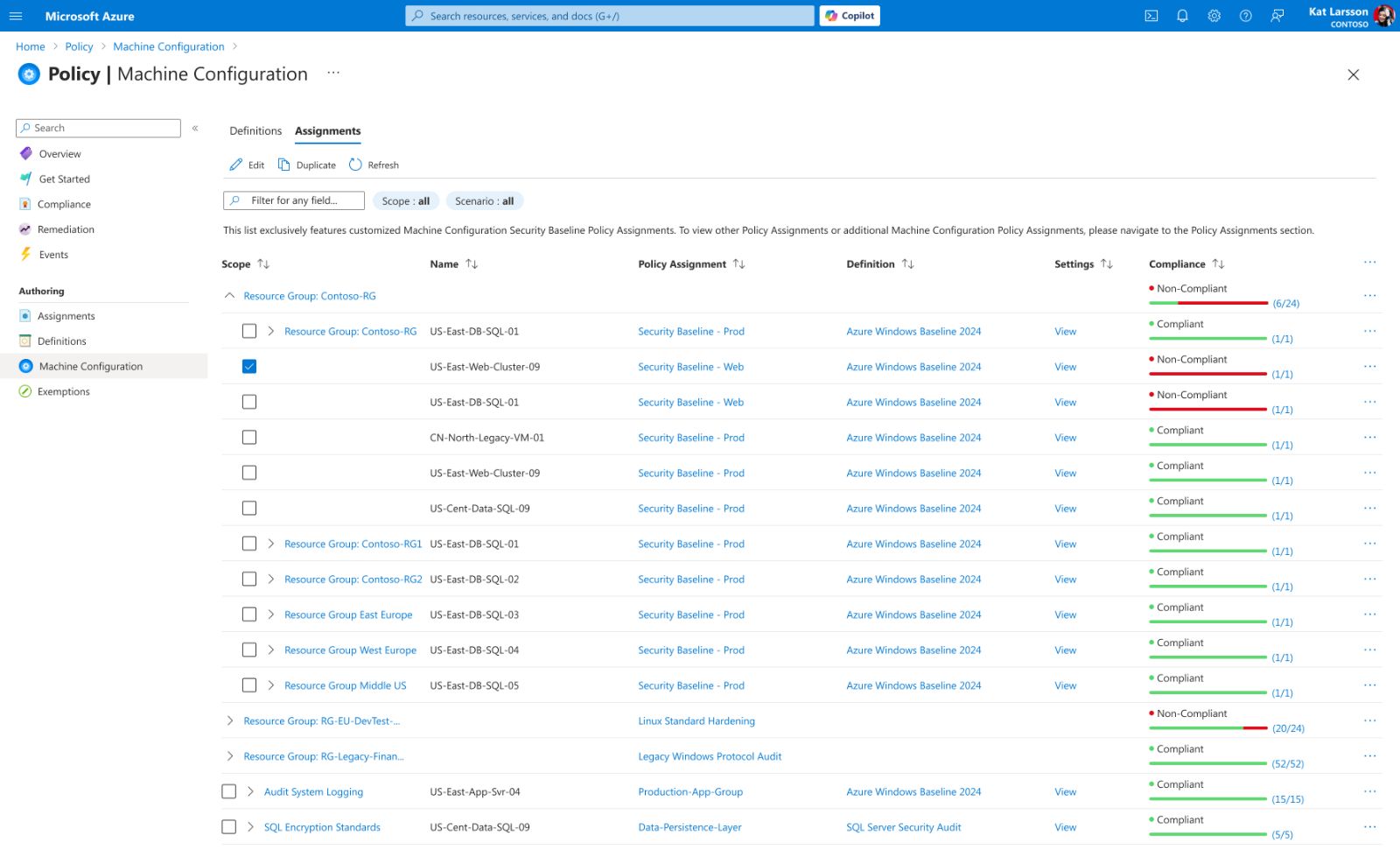
Option A: Grouped by Infrastructure
Resources are aggregated into collapsible containers based on technical hierarchy (Subscription > Resource Group > Region). Users navigate by drilling down into specific folders to inspect assets.
Pros: Contextual Clarity. Perfectly matches the user's mental model of their physical or logical infrastructure layout. Ideal for inventory management.
Cons: "Status Hiding." Critical failures are often buried deep within healthy-looking groups. Identifying a single "Non-Compliant" resource requires expanding multiple folder layers, significantly increasing the time to detect risks.
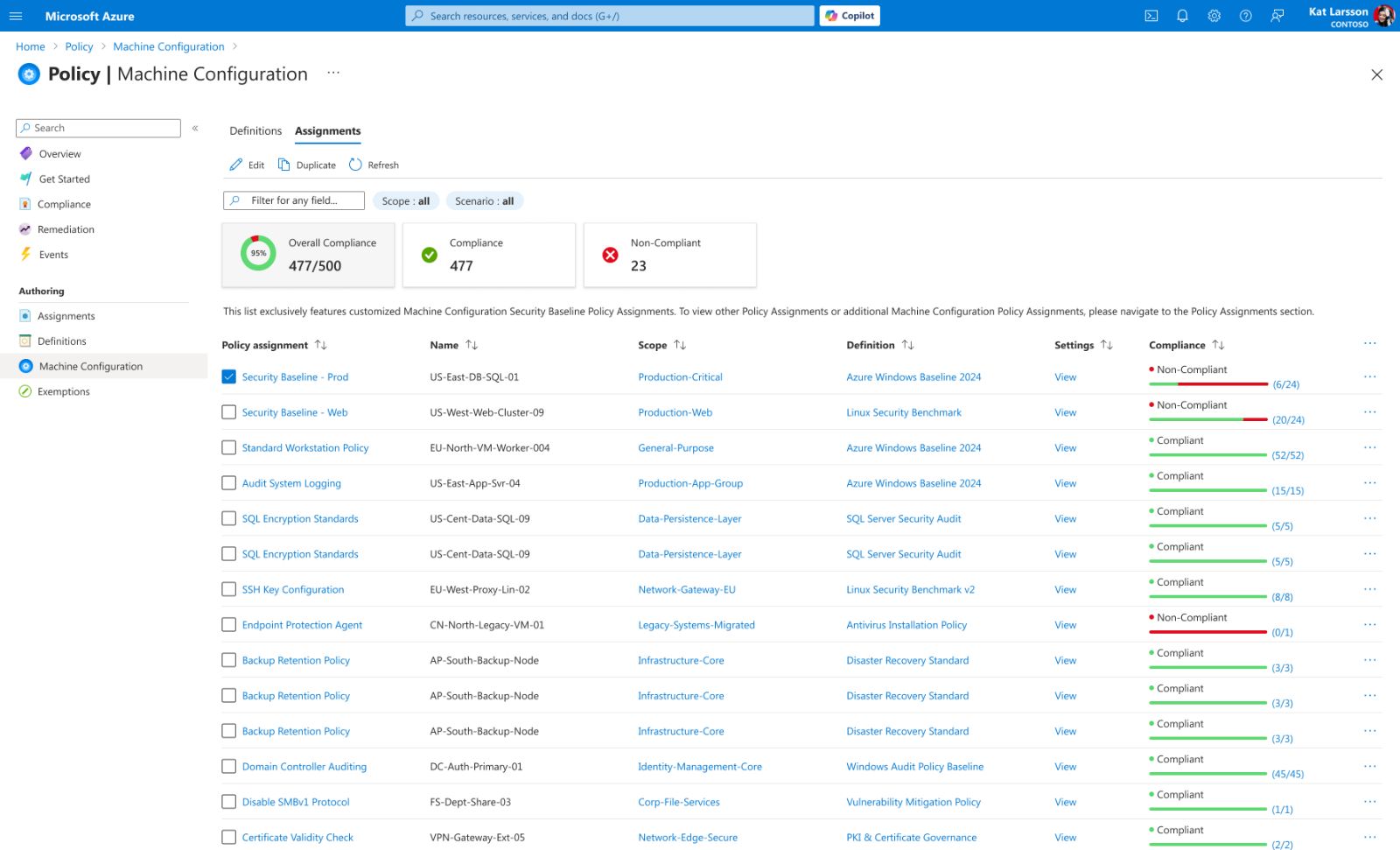
Option B: Insight-Driven View
A flattened, scoped list empowered by KPI Dashboards and smart filtering. It ignores folder depth to bubble up "Non-Compliant" items directly to the top level.
Pros: Action-Oriented. Shifts the focus from "browsing" to "fixing." Administrators can identify and target risky resources instantly via the dashboard, reducing the "Time-to-Detect" from minutes to seconds.
Cons: Loss of Hierarchy. Users lose the immediate visual context of which folder a server belongs to (solved by adding metadata columns).
The Verdict
We chose Option B. Given the "Black Box" anxiety discovered in research, we prioritized safety over speed . We added a "Validation" step that simulates the policy impact before it touches a real server.
04 The Solution
The final design consolidates complex workflows into a unified interface. Use the interactive viewer below to explore the rationale behind each key view.
Process Flow Diagram
This diagram illustrates the end-to-end data flow: starting from the ingestion of legacy GPO templates, passing through the validation engine, and finally synchronizing with the Azure Resource Manager for deployment.
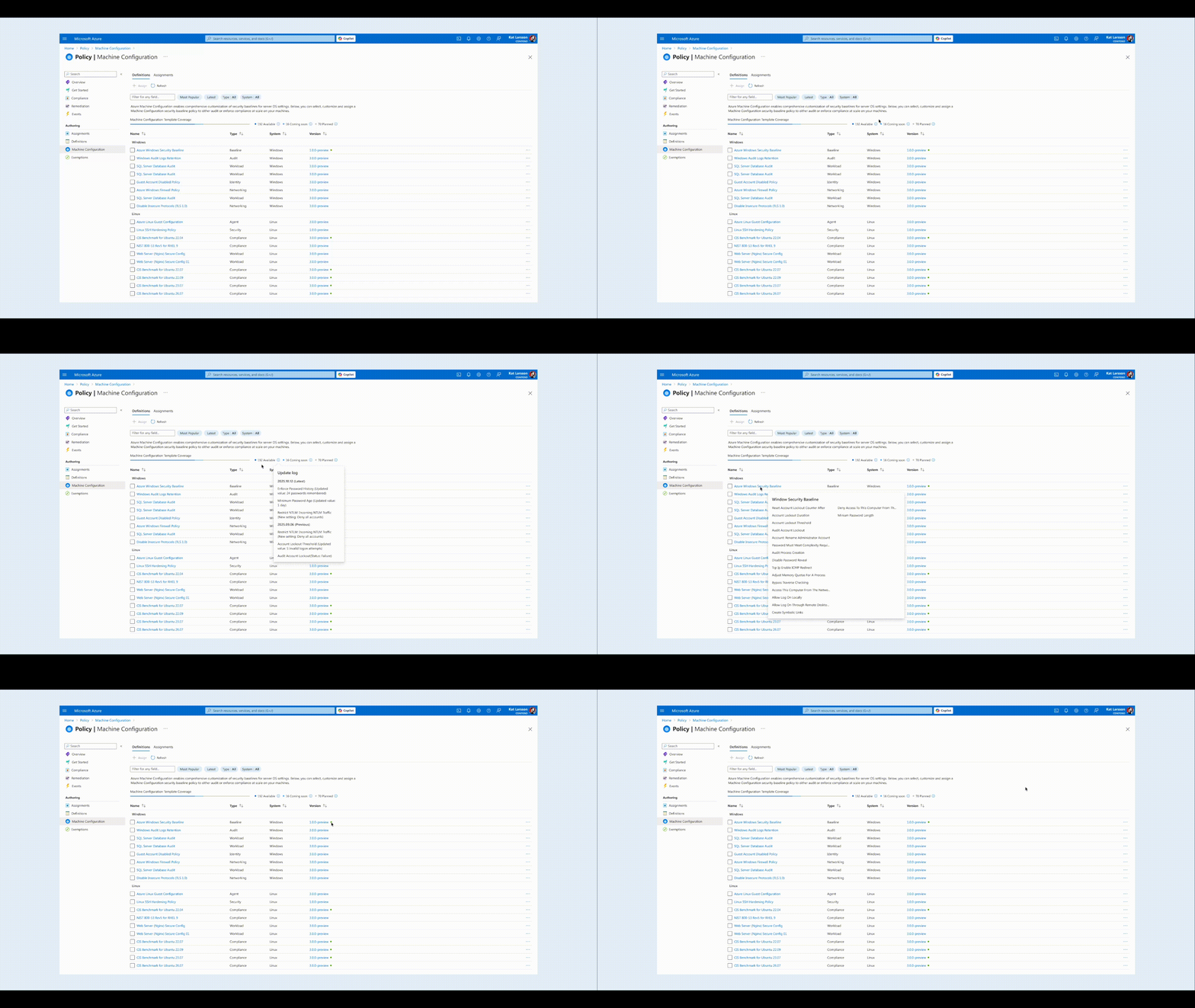
The Pain Point
Administrators struggled with flattened, unstructured policy lists and were forced to exit the workflow to verify version updates. This lack of hierarchy and context led to high cognitive load and update fatigue.
Design Solution
The redesigned interface integrates OS-level grouping with hover-triggered change logs. This combination allows users to visualize fleet coverage and assess critical version differences instantly within the same view, eliminating the need for context switching.
05 Impact & Key Learnings
The Impact
By shifting from manual maintenance to automated compliance , we helped 12+ enterprise clients (including Nike & Home Depot) accelerate their cloud migration.
Design as a "Safety Net"
In enterprise contexts, efficiency means nothing without accuracy. The interface must actively prevent errors—using constraints like toggle switches and 'just-in-time' risk alerts—rather than relying solely on user memory.
Translating Logic to Language
A major breakthrough was realizing that accurate data (e.g., 'false') isn't always useful data. Effective B2B design requires acting as a translator—converting raw backend logic into clear human concepts (e.g., 'Disabled') to reduce cognitive load.
Contextual Intelligence
Users shouldn't have to leave their workflow to verify a decision. Embedding auxiliary data—like the hover-triggered 'Update Log'—proved that progressive disclosure is key to maintaining flow in complex systems.
"Successful digital transformation isn't about the technology—it's about the confidence to use it."